
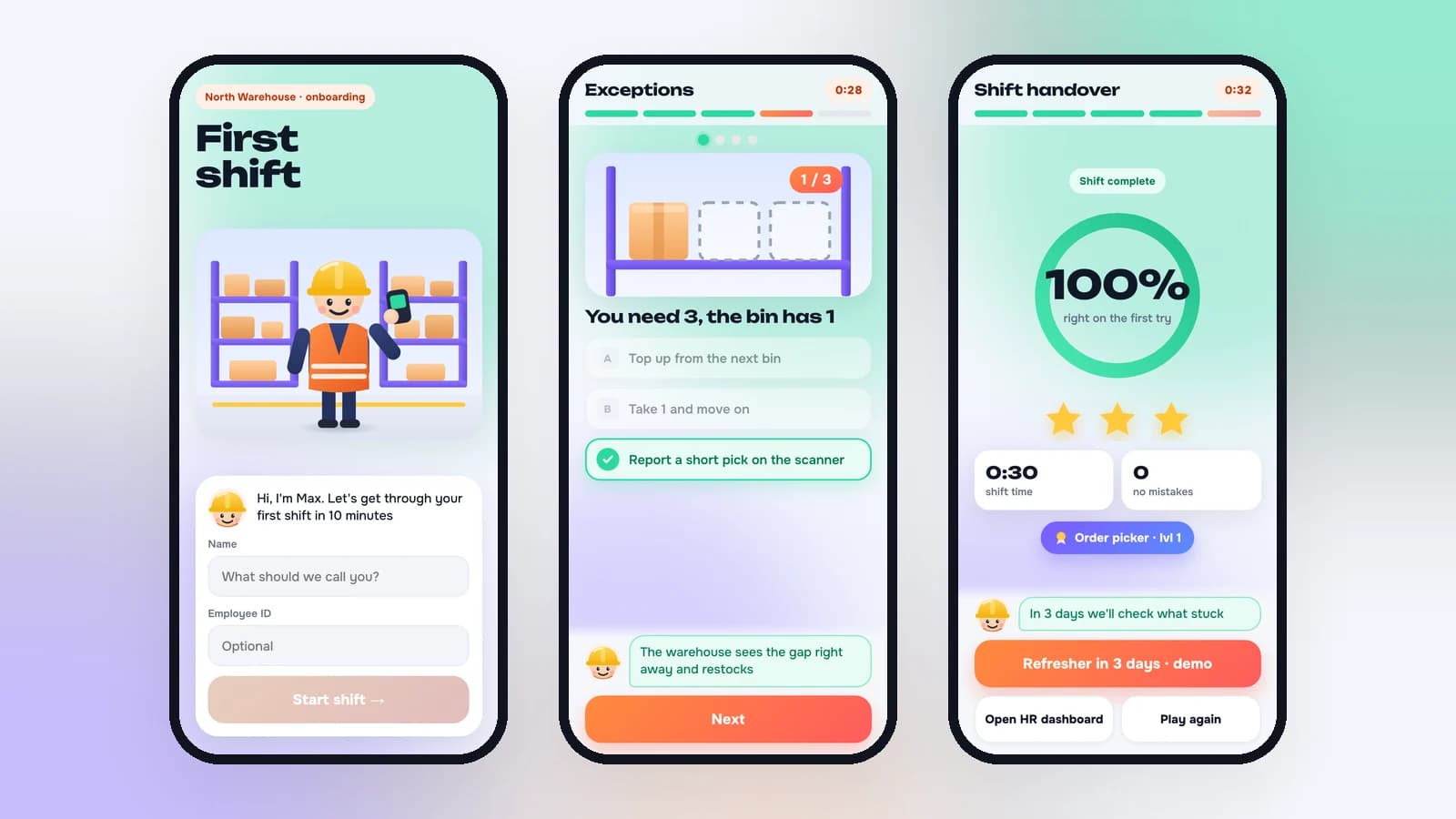

For years we have built browser games for employees: team events, marathons, games for companies with thousands of people. This one is different. It isn't a party. It's the first day of a new job, and it has to work for people who will never sit at a desk.
How do you onboard hundreds of frontline warehouse workers so they learn the rules by doing, and HR can see what actually stuck? Give them the first shift as a game on their own phone, keep it under 15 minutes, and record every tap as learning data.
The client
A logistics company with more than 5,000 employees and large warehouses in several regions. We're not naming them. About 3,000 people work in the warehouses, and the biggest single role there is the order picker: roughly 1,500 people.
The problem
- The first shift decides whether there's a second one. A new picker gets a vest, sits through an hour of safety briefing, signs the log and walks onto a floor where forklifts move, the scanner beeps errors nobody explained and every bin looks the same. If that day feels confusing and a little scary, a lot of people don't come back.
- The briefing is a checkbox. HR knows who attended. It doesn't know who understood what to do with a short pick or where not to walk when a forklift turns into the aisle.
- No desk, no laptop. Pickers have smartphones, not work computers. Anything that needs an install, an account or a training portal won't get used.
- The hiring never stops. On a role this size, new people start every week, so onboarding has to run on its own.
What the brief said
- Time: 15 minutes at most, or people skip it or click through
- Access: a QR code or a link, no app, no sign-up
- Content: the warehouse's real rules: protective gear, bin locations, the handheld scanner, what to do when something goes wrong
- For HR: where people get stuck, which rules don't land, and whether new hires still remember them a week later
We added one rule of our own: no slide deck with a Next button. If training can be skipped without reading, it will be.
How we approached it: one role, one day
We narrowed it first. A warehouse has dozens of roles, but the order picker is the biggest one, the process is the same in every building, and mistakes are easy to count: wrong bin, wrong quantity, wrong item.
Then we broke a real shift into steps and asked one question about each: what should a new hire be able to do with their own hands by the end of this step? The answers made five blocks, in the order of a working day: the entrance, the warehouse map, picking an order, exceptions, and the shift handover.
Every block follows the same pattern: a 5–10 second picture of what to do, then the player does it, then instant feedback. There's no test at the end. A rule is learned at the moment someone applies it, and a mistake shows the right way immediately.
If a rule can be shown with a picture, we show it with a picture. Text gets one line, and only where nothing else works.
The game: five blocks of a first shift
A mentor called Max walks the player through the shift. He's a friendly senior picker in a yellow hard hat who says one short thing at the right moment, the way a good shift lead does.
Press Play. It works on a phone or a laptop, and takes about 12 minutes.
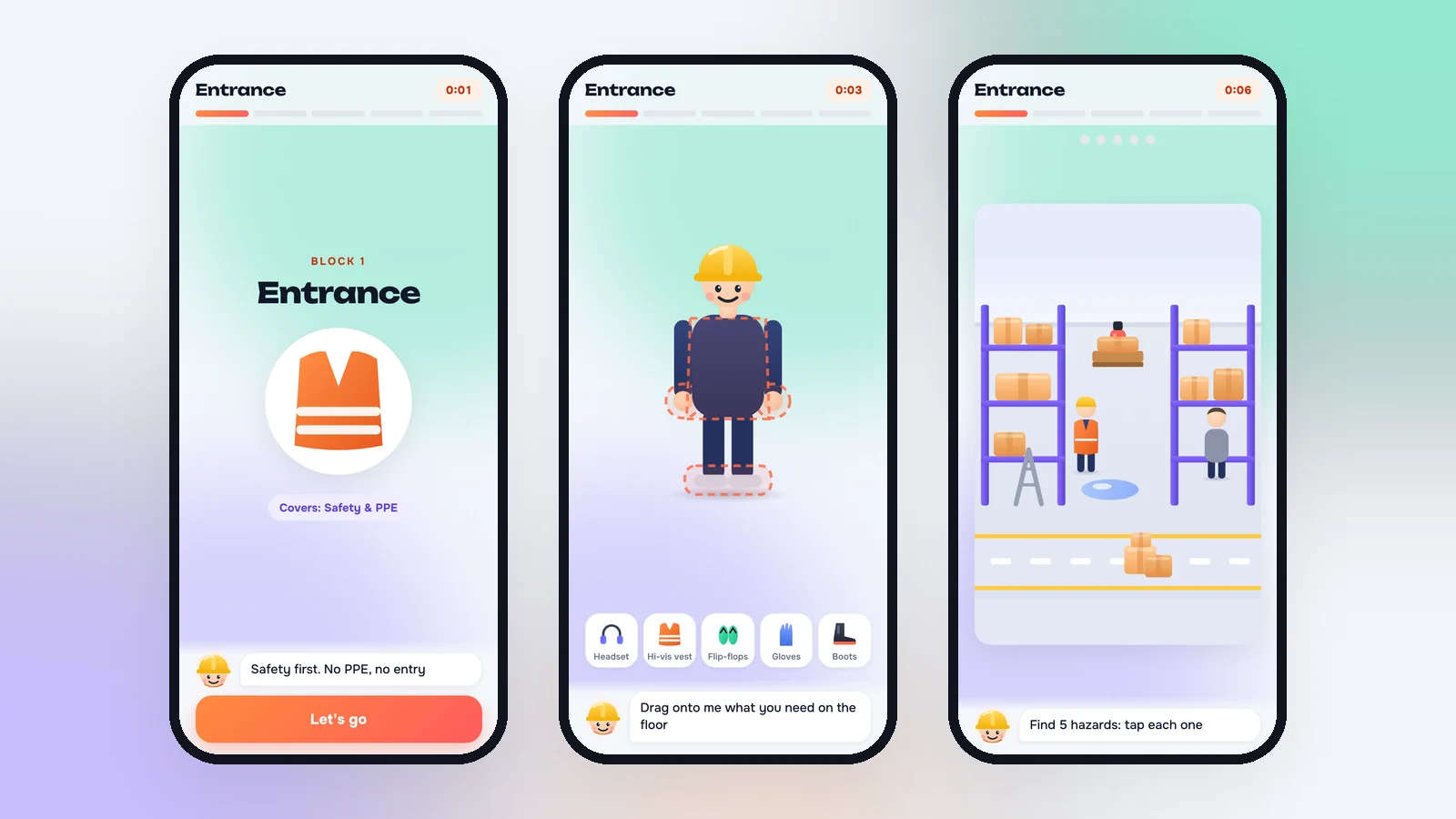
1. The entrance. Protective gear first, because nobody gets on the floor without it. The player dresses Max by dragging the hi-vis vest, gloves and safety boots onto him. The tray also holds two traps: headphones and flip-flops. Empty slots pulse; a wrong item gets a short shake and one line from Max. Then a photo of the floor: find five violations, like boxes in the aisle, a spill, a person without a vest, a ladder left out and a blocked fire extinguisher.
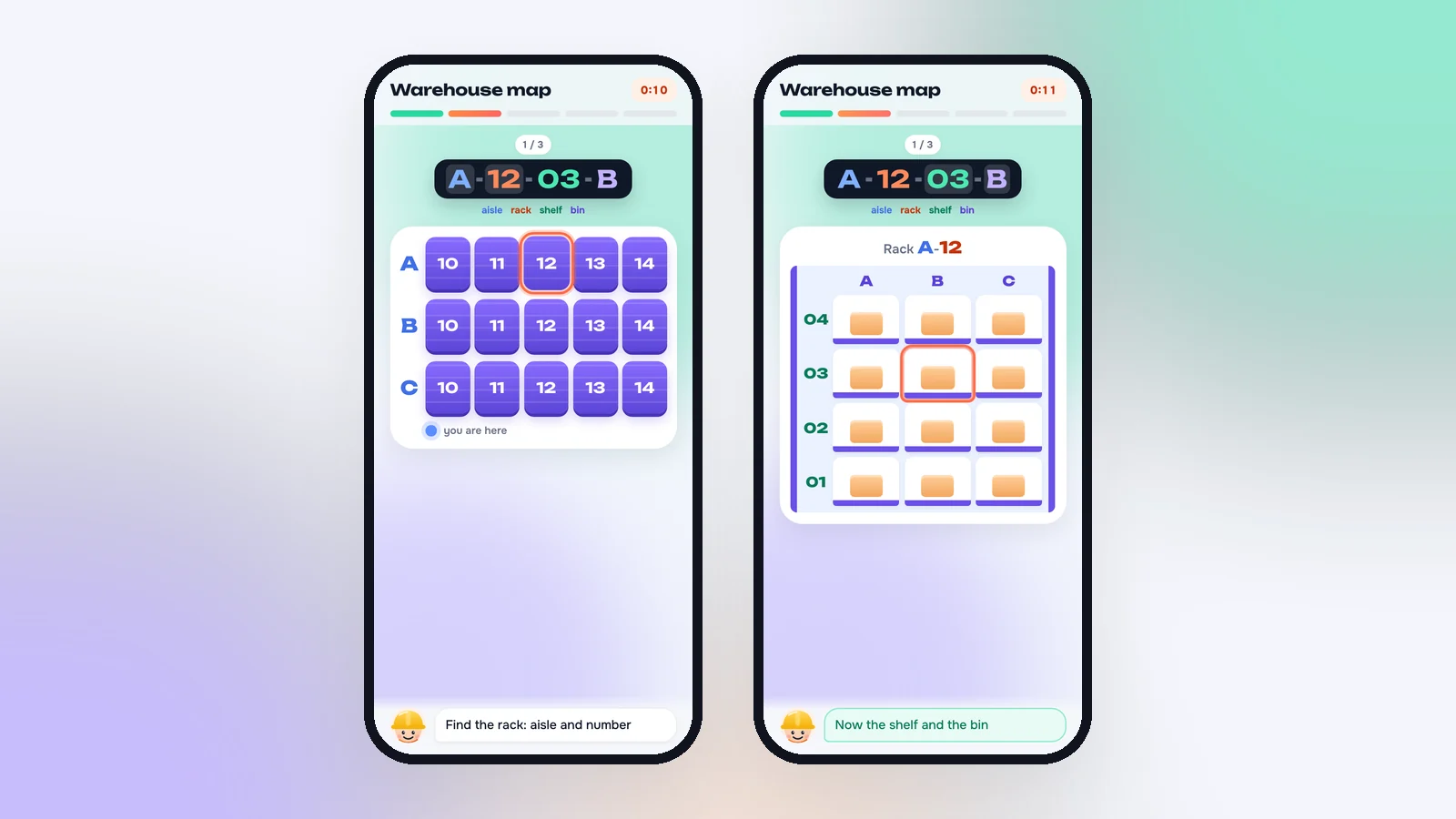
2. The warehouse map. A bin location like A-12-03-B stops being a code. Each part has its own color: aisle, rack, shelf, bin. The player finds the rack on the floor plan, then the bin on the rack. The first time, the target is highlighted. After three locations the format reads without help.
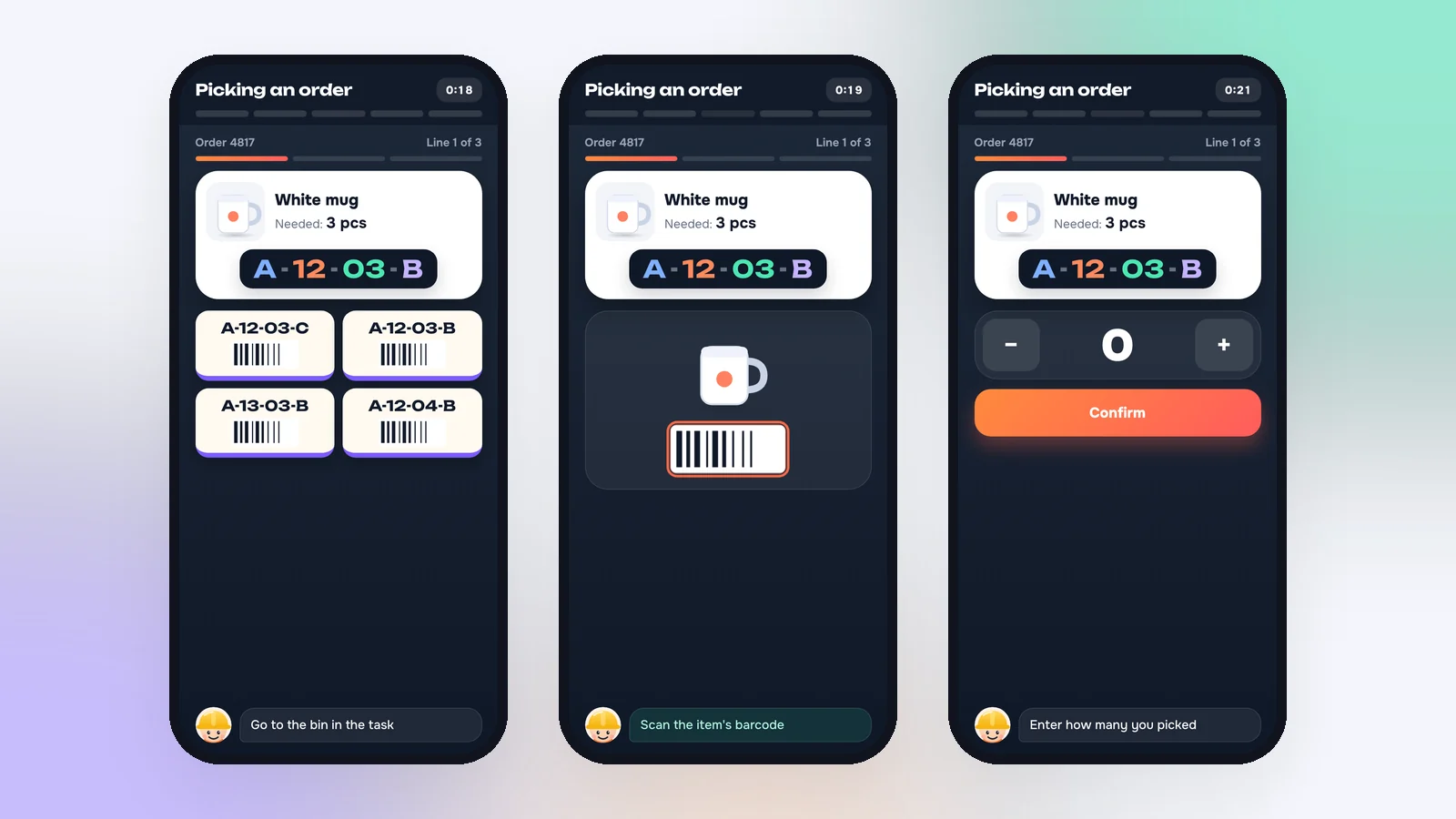
3. Picking an order. The screen works like a real handheld scanner, so nothing on the first day is new. Pick the right bin among similar ones, scan the item, enter the quantity, confirm. Wrong bin: the screen flashes and the step repeats. A shift timer runs, but accuracy counts for more than speed, the same as on the floor.
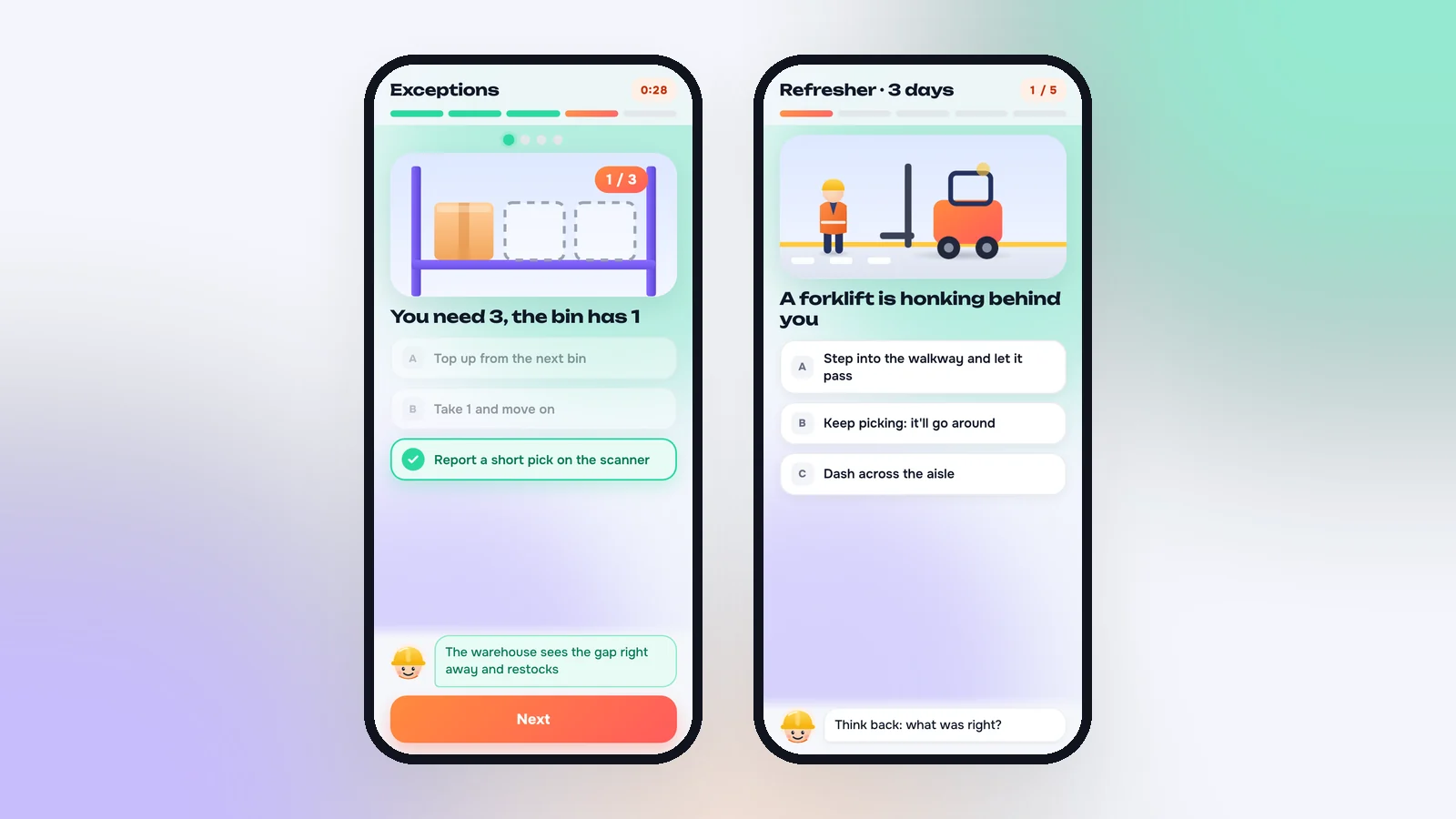
4. Exceptions. When something goes wrong. This is the core of the training. The order needs three, the bin has one. A box is crushed. The barcode doesn't match. A forklift is coming down the aisle. We made the wrong answers believable on purpose: they're the ones that seem logical when you don't know the procedure yet. "Take the rest from the next bin" sounds sensible until you learn that's how mis-picks happen. A wrong answer gets one line from Max on why, and the situation comes back.
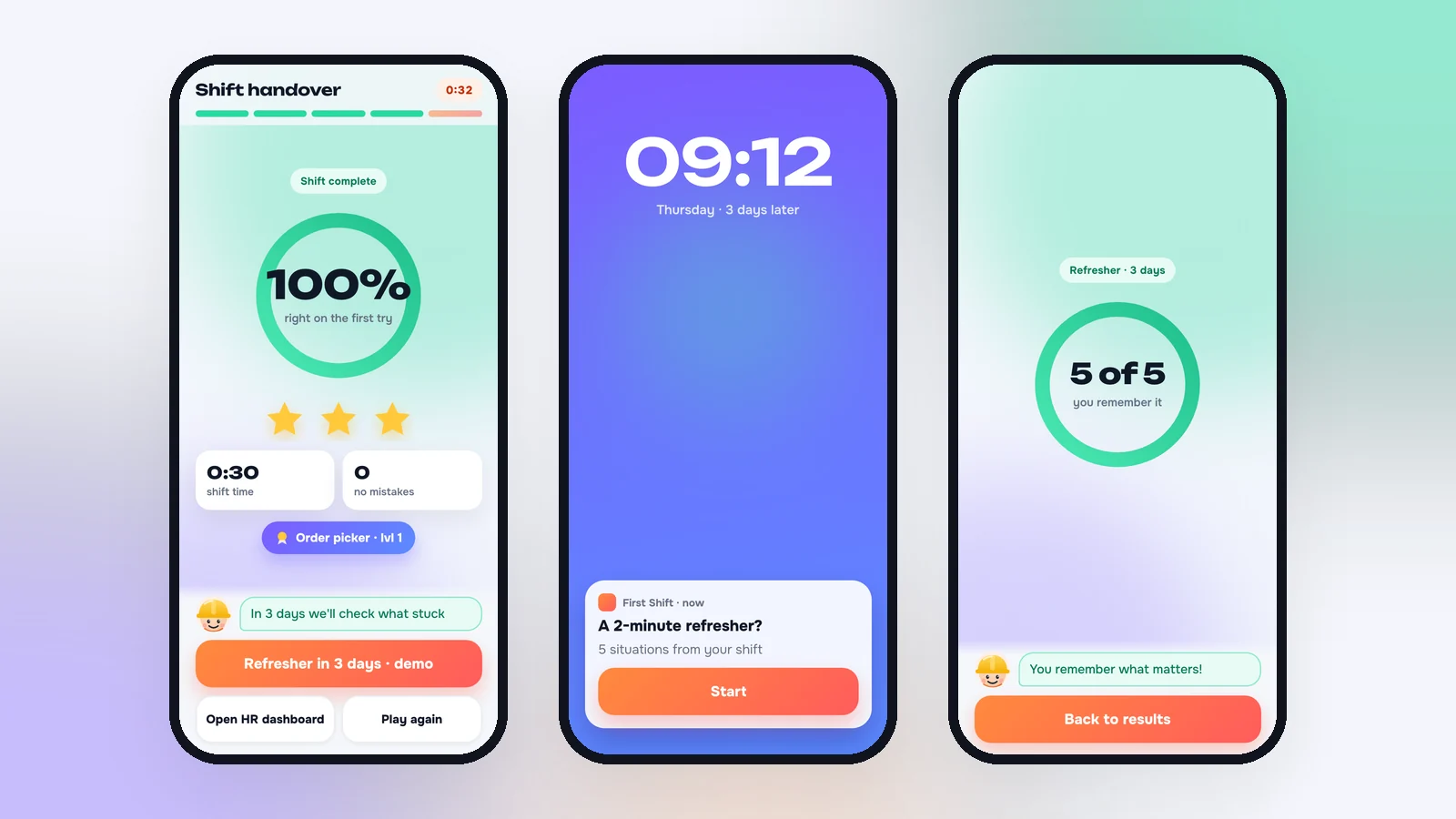
5. Shift handover. The result is in the language of the job: accuracy on the first try, shift time, mistakes reviewed. Stars and a title: "Order picker · lvl 1". There's no leaderboard, on purpose. More on that below.
Fewer words, more signals
In early runs we caught ourselves explaining the same event three times: a banner, a line from the mentor and a pop-up. For someone looking at a phone in the break room between shifts, that's noise. So we kept one rule: one event, one signal.
Hints became visual. An empty slot pulses, the right bin blinks, the screen shakes on a mistake, and a correct answer turns mint green with a check mark. Max says one short line, and only when it actually helps.
What HR sees
For HR, every tap is data. We put it into a dashboard that answers three questions: how many people finished and where the rest dropped off, which rules don't land, and which new hires need a mentor's attention.
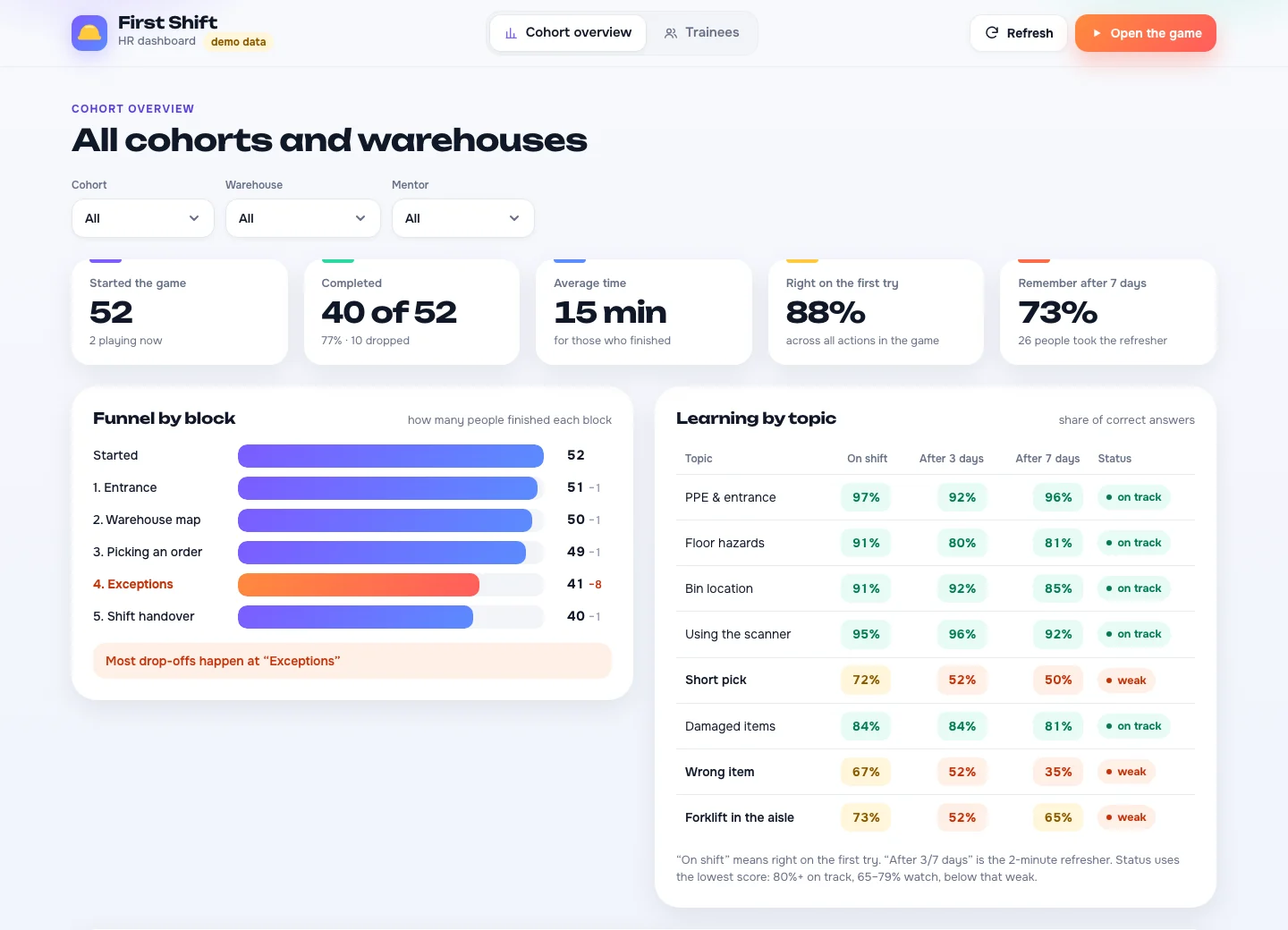
- A funnel through the five blocks: where new hires stop, and which block to simplify
- A topic map: the share of correct answers per rule, right away and after 3 and 7 days, with a status in words, not only colors: on track, watch, weak
- Recommendations: which topics to reinforce in the live briefing
- A card for each employee: attempts, mistakes and hints in every block, a feed of mistakes showing exactly what the person chose, and a note for the mentor before their first real shift
- Export to Excel, filtered by cohort, site, mentor or status
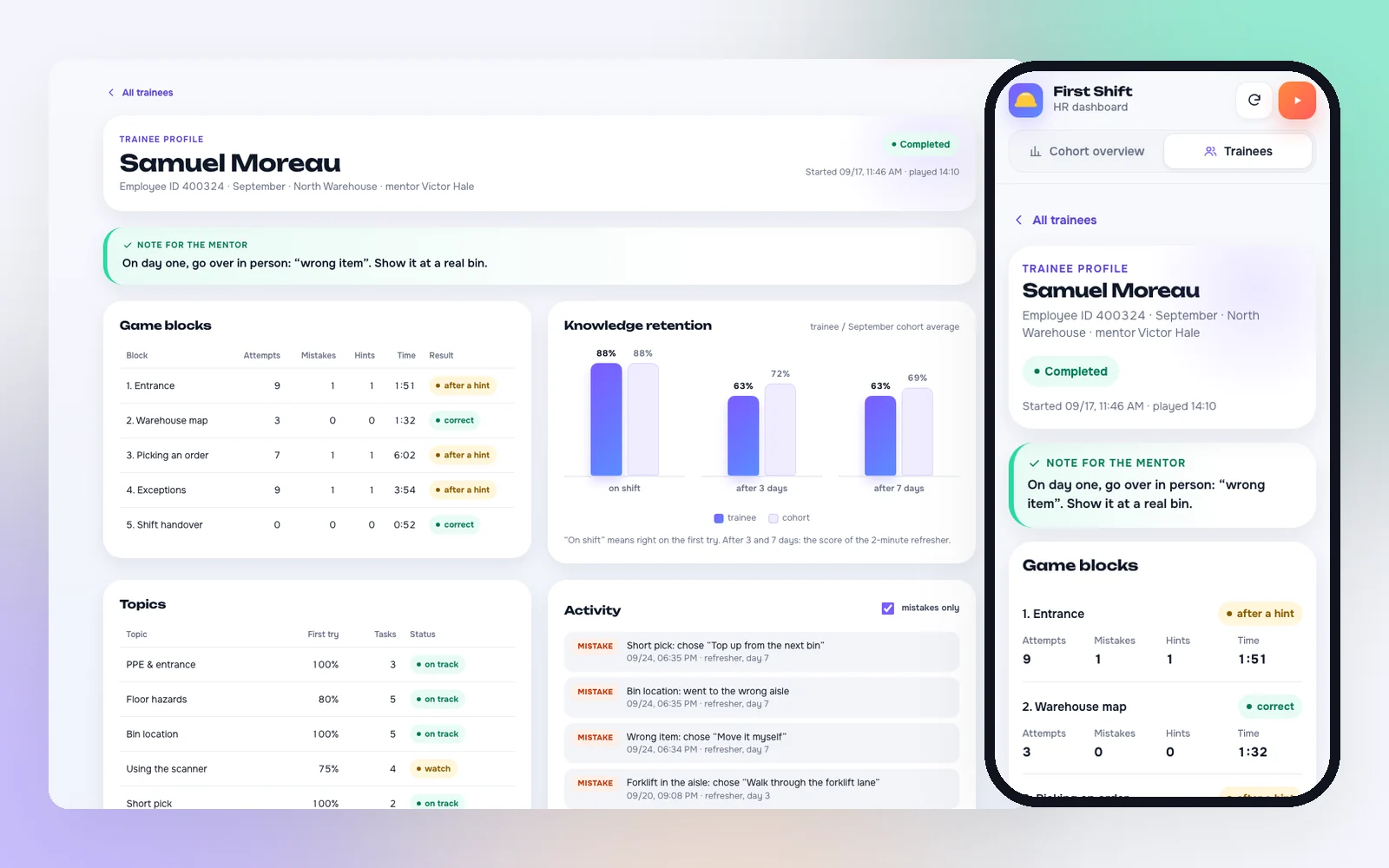
You can open the demo dashboard from here or from the game's result screen. Play the shift above first, and your own result appears there next to the sample trainees, in this browser only.
Why there's no leaderboard
We were tempted. Competition drives engagement, and our event games use it all the time. But onboarding isn't a tournament. A new hire who sees themselves in 47th place on day one isn't walking into shift two with much enthusiasm.
So the rule is: each employee sees only their own progress. HR and the mentor see everyone. Nobody sees a ranking. The dashboard doesn't even sort by accuracy, so the list can't quietly turn into one.
Finished isn't the same as remembered
Completing training doesn't mean the rule stayed. So after 3 days and again after 7, the employee gets a link to a two-minute refresher: five situations, starting with the topics they got wrong. One attempt, no hints. That makes it a measurement, not practice.
HR sees how well knowledge holds up for each person and for the cohort, and which topics fade fastest. That number, not "100% completed", is what learning retention actually means.
How we tested it
We ran the game with a bot that plays the whole shift, and checked that every action landed correctly in the analytics. It paid off. One run showed that a fast double tap on Confirm recorded the correct answer several times, so the number of attempts in the HR dashboard grew for no reason. A player would never notice. The analytics would have been wrong. We fixed it before anyone saw it.
The look changed too. The first version used a muted beige "warehouse" palette: neat, but dull. We built three style directions on real game screens and chose the light one. It reads better on a phone under bright warehouse lighting, and it works equally well in the game and in the HR dashboard.
We also checked the layout on seven screen sizes, from a 320-pixel phone to a wide monitor. Turning the phone sideways doesn't break it either: the action button is always visible, and the illustrations fit the height of the screen.
What it adds up to
These are estimates for a company this size, not results we're reporting. We'll replace them with real numbers after the pilot.
| People working in the warehouses | about 3,000 |
| Order pickers among them | about 1,500 |
| New pickers per year, at turnover typical for the role | 1,000–1,500, about 100 a month |
| People who don't need to be hired and trained again, if the game keeps just 5 in 100 through the first month | 50–75 a year |
Why we expect at least that:
- Less fear on day one. New hires walk onto the floor having already lived through a shift. They know how to read a bin location, how the scanner works and what to do when an item is short.
- Mistakes happen in the game, not on the floor. Short picks, mis-picks, a forklift in the aisle: the costliest mistakes happen on a phone screen, where they cost nothing.
- Mentors know where to look. Each new hire's weak topics are visible before the first shift, so the mentor coaches those instead of repeating the whole briefing.
- The briefing gets sharper. The topic map shows which rules don't land for the whole cohort, and HR reinforces those first.
- No IT project. A QR code on a phone, no install, no accounts. Launching at a new warehouse takes a day, not a month.
The next step is a pilot with a real cohort of new hires: we'll compare game data with picking errors in the first week and retention after a month.
What the company gets
- First Shift, a 12–15 minute game: a new hire lives through a working day before stepping onto the floor
- Access from any phone by QR code, with no install, no sign-up and no work computer
- An HR dashboard: the funnel, the topic map, a card for every employee and notes for mentors
- Knowledge checks after 3 and 7 days: a measure of what stuck, not a "completed" checkbox
- A template that carries over to other frontline roles: receiving clerks, cashiers, couriers, call-center agents
Good onboarding isn't a thicker manual. It's a shorter path from "I'm scared" to "I know what to do."
The company and warehouse in the demo are made up, and the trainees in the HR dashboard are sample data.
If you want to see how we build games around a specific job, read the four-departments case, or see how custom builds work.
Frequently Asked Questions
How long does the onboarding game take?
About 12–15 minutes on a phone. After 3 and 7 days the employee plays a two-minute refresher, which checks whether the rules stuck.
Do employees need to install anything?
No. They open the game from a link or a QR code in their phone's browser and enter a name or an employee ID. No app, no account and no work computer.
What data does HR get?
A funnel through the game's blocks, the share of correct answers for each topic right away and after 3 and 7 days, a card for each employee with their mistakes and a note for the mentor, and an Excel export. There's no employee leaderboard: each person sees only their own progress.
Can the game be adapted to our role and procedures?
Yes. The scenario is built from your procedures, and the template carries over to other frontline roles: receiving clerks, cashiers, couriers, call-center agents. The visuals are recolored to your brand.